Platforms · data
Platforms, live data and the chart-delay problem
The first wall everyone hits isn't a trade, it's a delayed chart. Here is the stack I use, why Tradovate, the four ways to get NQ live on TradingView in order of cost, the one setting to change before your first trade, and the symbols that confuse people coming from CFDs.
Some links on this page are affiliate links. If you sign up through them with code ABHI, you get a discount and I get a commission. It doesn't change what I've written here.
The first wall everyone hits
Before anyone asks me about entries or payouts, they ask why their chart is wrong. "TradingView shows NQ ten minutes late." "I connected my broker and price still updates every five seconds." "Which platform are you even on?" It's the same wall every time, and it's a wall of plumbing, not of trading.
Futures data is exchange data. CME charges for it in real time, and free charting shows it delayed. The prop firm you buy an account from gives you a live feed through its broker, and the whole job of setting up is getting that live feed onto a chart you like, with a button you can click next to it. Here is how mine is wired, why, and how to get yours to the same place for as little money as possible.
The prop-firm account lives at Tradovate, and Tradovate is what carries the live exchange feed. TradingView borrows that feed once you connect the broker; TradeSyncer sits behind Tradovate and repeats each order to the other accounts.
Why Tradovate, and when Rithmic
Every firm on my firm-choice guide offers Tradovate, and Apex also offers Rithmic. I chose Tradovate for reasons that have nothing to do with fill quality: the user base is much larger, so every question you'll ever have is already answered on YouTube or a forum; the learning curve is short; and it runs in a browser tab, so there's nothing to install and nothing to break. When a beginner asks me which one, the answer is Tradovate because the help is everywhere.
Rithmic is a data-and-routing backbone rather than a platform; you trade it through NinjaTrader or similar. If you already live in NinjaTrader, or a firm's Rithmic account is meaningfully cheaper that week, it's fine. Just know you're buying yourself a steeper setup, and the "only Sim101 shows up" problems people message me about are almost always a Rithmic login or entitlement issue on the NinjaTrader side, which the firm's support has to fix. I've never had to.
The delay, and four ways out of it
TradingView's free NQ chart is delayed because you haven't paid CME for the real-time feed. The fix isn't necessarily to pay TradingView; it's to prove to TradingView that you already have the feed through your broker.
- 01 Connect Tradovate inside TradingView Open the Trading Panel at the bottom of a TradingView chart, pick Tradovate, log in with the prop-firm account's credentials. TradingView then treats the CME data you already have through Tradovate as yours, and the chart goes live. The link has to be re-verified about weekly; logging in again does it. In my experience there can still be a small lag on the free plan compared with Tradovate's own chart, a few seconds rather than ten minutes. For a 20-point target on a 1-minute chart it doesn't matter. For a 15-second entry it might.
- 02 Or just chart NAS100 while you learn The CFD symbol NAS100 tracks the same index in real time and is free on TradingView. The candles are nearly identical to NQ's. You can't trade it at a futures firm, but for reading structure, marking levels and practising bias it's as good, and it costs nothing.
- 03 Or use Tradovate's own charts They're live by definition, since the broker is the feed. They're less pleasant to draw on than TradingView, which is the only reason I don't. My execution screen is three Tradovate panes anyway: 15-second, 1-minute and 5-minute.
- 04 Eventually, a paid TradingView plan This is what I run, and not for the data: the paid tiers unlock seconds-based charts, so I can watch 15-second and 30-second candles in TradingView as well as in Tradovate. It's the "set for life" step, and it's the last one, after the account and the broker connection, never the first.
Timeframes, and what's on the chart
I form the day's bias on the hourly and the 15-minute in TradingView, where I can draw. Then I drop to Tradovate to execute, where the three panes are 15-second, 1-minute and 5-minute. The entry itself is a limit order resting at an order block, expecting a 20-point rejection from it; the size, stop and target never change, so the Tradovate order ticket is preset to one contract with a 20-point take-profit and stop-loss and "End of day" as the time in force.
People ask for indicator settings under every clip. What you're seeing on my Tradovate panes is candles and a single moving average for orientation; the edge isn't in a setting, it's in the bias and the level. The daily-bias guide covers the first half; the second half is what the community works on live.
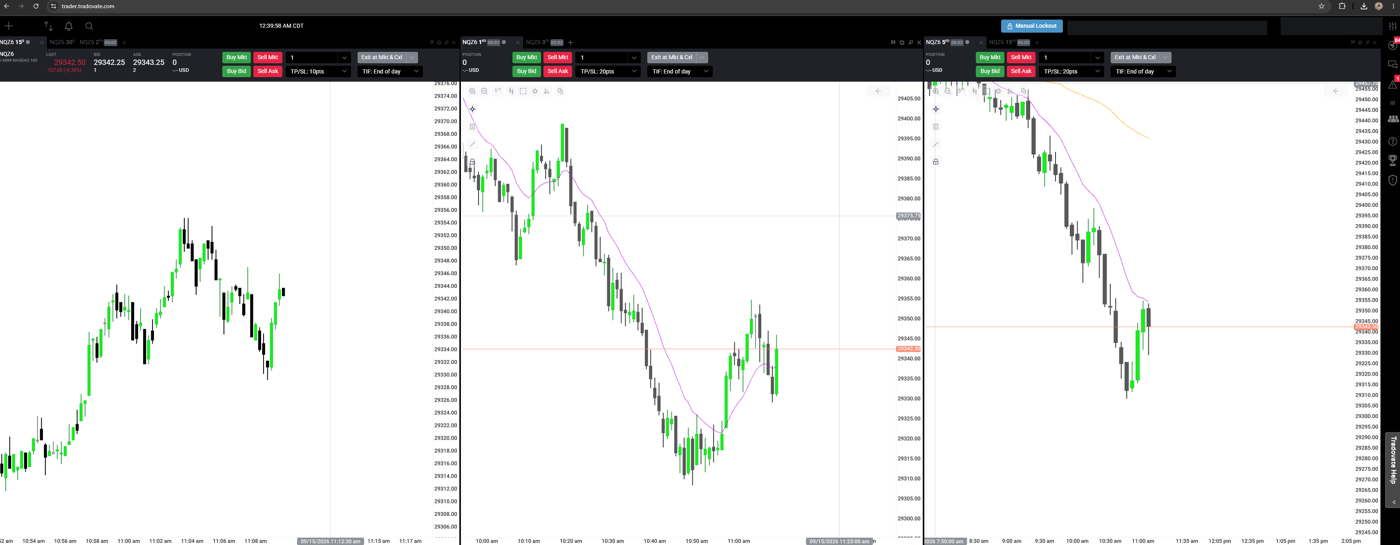
- Bias
- 1-hour and 15-minute, TradingView
- Execution
- 15-second, 1-minute, 5-minute, Tradovate
- Entry
- limit order at an order block
- Ticket preset
- 1 contract · TP/SL 20 points · TIF end of day
- Daily loss
- $800, auto-liquidate, set in Tradovate
The one Tradovate setting that matters more than any chart
Top right of the Tradovate header is a button called Manual Lockout, and next to it, in the account settings, a daily loss limit that auto-liquidates when hit. Mine is set to $800. When it triggers, every position closes and the account won't accept another order that day. That isn't a feature I'd trade without; it's the reason the "two-trade day" in my risk guide is a rule rather than an intention. Set it before your first trade, not after your first bad one.
Copying one click to many accounts
The question under every multi-account screenshot is "how do you place the same trade in twenty accounts". The answer is TradeSyncer, with Tradovate as the broker at every firm. I place one order in Tradovate; TradeSyncer sees it and repeats it, at the same size, in every connected account across Apex, Lucid, Tradeify and MFF. If the trade is wrong it's wrong everywhere, which is why the size and the stop are fixed and small. Copy trading between your own accounts is allowed at the firms I use; hedging between accounts is not, anywhere.
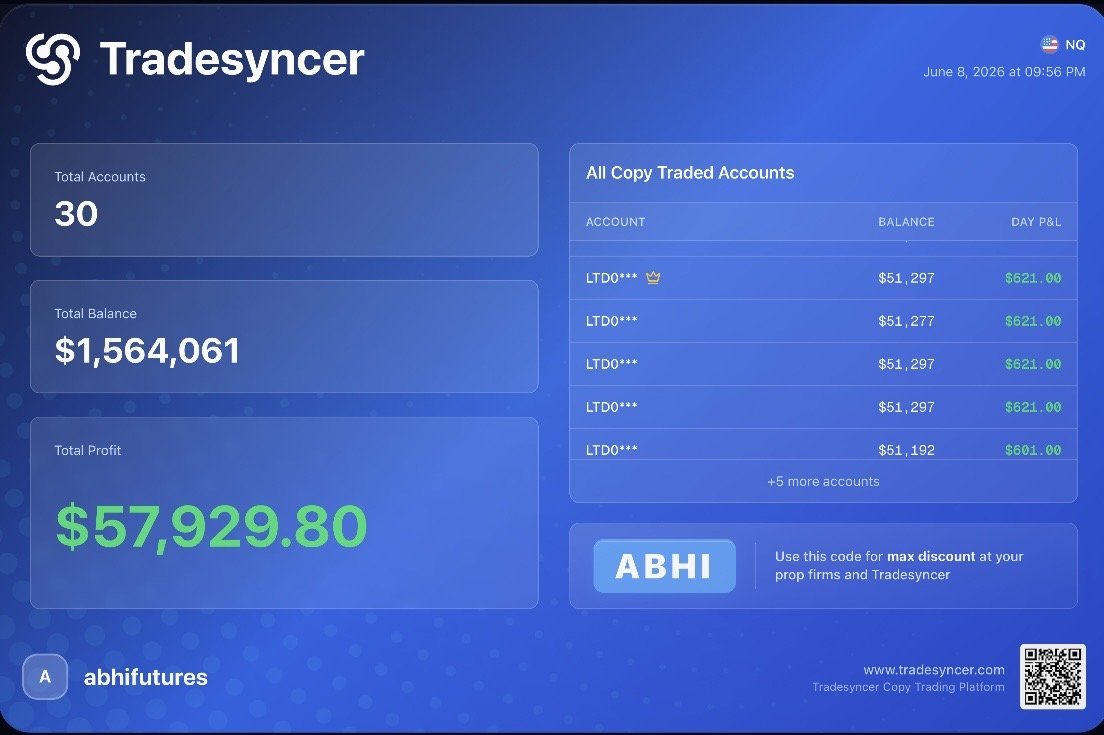
The setup, the quantity rules and the failure modes are their own series: copy trading overview, what TradeSyncer is, setting it up, and Tradovate's own free copier if you only have a few accounts at one firm.
Practising before you pay
Two different jobs. Forward testing, meaning trading your plan live on today's market without money, is free: TradingView's paper-trading account does it, and it's what I'd point a complete beginner at first. Backtesting, meaning replaying past sessions to see whether the plan would have worked, needs a replay tool, and the good ones cost money; FX Replay is the one I suggest.
My honest view is that you'll have to invest somewhere. Backtest until the setup is boring, forward-test on paper until the routine is boring, then buy the cheapest 50K on sale, connect Tradovate to TradingView, and later, when it earns its keep, a paid TradingView plan. That order keeps the money you spend behind the skill you've built rather than ahead of it.
Symbols, contracts and the small print
- SymbolNQZ6, not "NQ"Futures are dated. NQZ6 is the Nasdaq contract expiring December 2026; the letter is the month (H March, M June, U September, Z December), the digit is the year. Gold is GCZ6, micro gold MGCZ6. In TradingView, NQ1! is the continuous front-month chart.
- RolloverChange contract about a week before expiryVolume moves to the next contract a few days before the old one expires. Tradovate flags it; trade the one with the volume.
- First loginSign the non-professional market data agreementTradovate asks for it the first time you log in. Non-professional is correct for an individual trading their own or a prop account. It's the only paperwork I've ever had to do inside the platform.
- Micro vs miniChart the mini, trade whichever you size forNQ and MNQ track the same index tick for tick; watching NQ while trading MNQ is fine. The difference is $20 versus $2 a point.
- VPSNot for manual tradingA VPS is for bots that must stay connected. Two clicks a day from a laptop don't need one.
The questions I get, answered once
- "Do I need TradingView Premium?"No. Connect the broker firstPremium is for seconds charts and more indicators. It's step four, and plenty of people never need it.
- "Price still updates every 5 seconds after connecting"Check the panel is actually logged inThe broker link re-verifies weekly; a logged-out panel drops you back to delayed data. Log in again. If it's a slight lag rather than a delay, that's normal on the free plan and Tradovate's own chart will be a beat ahead.
- "Which platform, Tradovate or NinjaTrader?"Tradovate unless you already know NinjaBigger community, browser-based, less to configure. NinjaTrader is powerful and heavier.
- "Can I trade Nasdaq from India with my own money instead?"That's a different, harder routeA prop account gives you a live CME feed and capital for the price of an evaluation. The India guide covers why that's the sensible entry for most people here.
- "Is there a futures demo?"TradingView paper trading, or a cheap evalPaper for the routine, then the cheapest 50K on sale as the first account that counts.
- "Which timeframe do you trade?"Bias on 1H and 15m, entries on 1m with 15s and 5m alongsideThe timeframe isn't the edge. The bias is.
Once the chart is live, the next question is which account to put behind it.
Which prop firm and account to start withThe whole thing on one card
- Charts
- TradingView; NAS100 free while learning, NQ live once Tradovate is connected
- Execution
- Tradovate, browser; 15s / 1m / 5m panes
- Copier
- TradeSyncer, Tradovate as broker at every firm
- Delay fix, in order
- connect broker → NAS100 → Tradovate charts → paid plan for seconds charts
- First-login paperwork
- non-professional market data agreement
- Non-negotiable setting
- daily loss auto-liquidate, before the first trade
- Practice
- backtest (FX Replay) → paper (TradingView) → cheapest 50K on sale
Compare the firms first
Every firm on this page runs on Tradovate, so the platform won't decide your choice. Price, drawdown type and payout rail will. I keep an honest side-by-side, cons included.
Same code, ABHI, works at every firm on that page.
My own setup as of September 2026. TradingView plan features, broker-connection behaviour and data-entitlement rules are set by TradingView, Tradovate and CME and change; check their current help pages. Nothing here is a recommendation to trade, and trading futures involves substantial risk of loss.