Payouts · Apex · India
Apex payout to your Indian bank, step by step
Apex approves in hours; Plane pays in days. Here is the whole run from the Payouts menu to rupees in an ICICI account, with one real payout timed day by day and what to do when it looks stuck.
Some links on this page are affiliate links. If you sign up through them with code ABHI, you get a discount and I get a commission. It doesn't change what I've written here.
This is the Apex-specific version of how a prop-firm payout reaches your Indian bank. If you haven't read that one, the short version: Apex never pays your bank. Apex pays Plane, and Plane pays you. Everything below is the Apex half and the Plane half of that, in the order you'll live it.
The route
Where the wait actually is
People message me on day two of their first Apex payout convinced something has gone wrong. Nothing has. Apex itself is quick: in my dashboard most requests show Paid the same day they were made, and the slowest took three. What feels like Apex being slow is the handover to Plane, which is a separate company with its own onboarding, its own KYC, and its own transfer rail into India.
So the mental model for an Apex payout is two clocks, not one. Apex's clock runs from request to approval and is usually done before you've closed the tab. Plane's clock runs from approval to rupees in your account and takes three to five days, plus two or three more the very first time while your Plane account gets created.
One real payout, day by day
A repeat payout from a 50K EOD account this month. Not a first payout, so no invite wait. Dates are the ones on the Apex dashboard and Plane's payment record.
One payout from my own account, September 2026. The grey segment is Apex's clock, the green one is Plane's. Weekends sit inside that green stretch, which is why a Thursday request became a Tuesday credit.
The payout, stage by stage
-
01
Before you request
Make sure Apex will say yes
Almost every "rejected" story I hear is one of these four gates.
Apex checks four things when you request. Your balance has to be above the safety net plus the amount you're asking for. You need five qualifying days since your last payout, where a qualifying day means you closed with at least the minimum profit for your account size. No single day since the last payout can be 50% or more of the total. And the request has to be at least $500.
The one that catches people is the safety net. On a 50K account the drawdown is $2,000 and the safety net is $52,100, so a $1,500 first payout needs a balance of at least $53,600. People see $53,000 and request; Apex sees $900 of eligible profit and says no.
- Qualifying days needed
- 5, not consecutive, no deadline
- Min profit for a day to count (50K EOD)
- $250
- Safety net (50K)
- $52,100
- Balance needed for a $1,500 first payout
- $53,600
- Consistency
- biggest day under 50% of total
- Minimum request
- $500
- Max first payout (50K)
- $1,500
Other sizes and the full six-payout ladder are in the Apex payout rules guide. This page assumes you already pass.
-
02
In the Apex dashboard
Request it
Left menu, Payouts. Amount only; there is no bank to choose.
Log in at the Apex member area. The left-hand menu runs Dashboard, User, Purchases, Payouts, Charts, Accounts and so on. Under Payouts you pick the account, enter the amount, submit. There's no choice of rail on the Apex side, because Apex only has one: Plane.
Every request you've ever made then sits in a table on that same page with the columns that matter: payout number, requested on, amount requested, trading days, payout request status, and date finalised. Status is what you watch. It goes to Paid when Apex has approved and handed the money to Plane.
If you copy-trade several accounts, request from each one separately on the same day. Each performance account has its own ladder, so five 50K accounts on their first payout is five separate $1,500 requests, and they all show up as one block of rows.
Keep trading after you submit, but trade as if the requested amount is already gone from the balance. If the balance drops below the minimum before Apex processes it, the request is auto-denied and you request again later; the account isn't harmed.
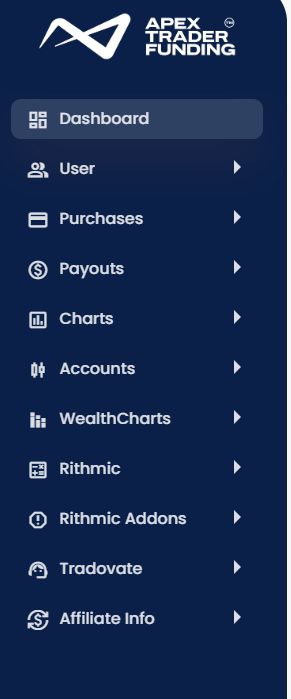
The Apex member menu. Payouts is the fourth item; everything in this stage happens under it. -
03
Hours to three days later
Approved, and a certificate you didn't ask for
Apex's part is now finished.
When the status flips to Paid, Apex also issues a "Rewards Certificate": a PDF with your name, the amount and the approval date. It's a nice thing to screenshot, and it's also the document you keep. Payout amount, approval date, your name on an Apex letterhead is exactly what a bank or a CA would want to see next to the credit.

The certificate Apex issues on approval. Amount, date, your name. Keep it with the bank credit. Looking back at my own table, approvals took between zero and three days. Requests made mid-week were mostly same-day; a batch requested on a Tuesday in March was finalised on the Friday. That's the whole range I've seen.
-
04
First payout only
The Plane invitation
Two or three quiet days, then an email. This is the wait that worries people.
Apex has to create you as a contractor inside Plane before Plane can pay you. That takes two or three days after your first approval and you get no progress bar for it. Then an email arrives from Plane inviting you to set up your account. Sign up with the same email you use at Apex; a different one creates a second identity that nobody can match to your payout.
Inside Plane you'll see yourself listed as a contractor of Apex Trader Funding Inc. That's the correct relationship: you're an independent contractor paid by a US company, which is also why the next two documents exist.
- KYCIdentity checkUse your PAN card or passport. Same advice as every other portal: don't lead with Aadhaar.
- W-8BENA US tax form you sign electronicallyIt certifies you are not a US taxpayer so Plane pays you gross, with no US withholding. Your PAN goes in as the foreign tax identifying number, your Indian address as the permanent residence. You fill it in and sign it electronically inside Plane; it then lives under Documents, and the form has to be redone every few years.
Once your Plane account exists, no future Apex payout ever waits for this step again. It's why the first payout bar in the overview guide is longer than every other one.
-
05
Inside Plane
Add your Indian bank account
Payments → Bank accounts. Currency INR. One default, as many as you like.
Plane's left menu has Home, Personal, Payments (with History and Bank accounts underneath), Expenses, Time off, Documents, Compliance and Reports. Most of it is built for salaried contractors and you'll never touch it. You need Bank accounts once, and History every time you want to know where a payout is.
Add the account as an INR bank account: account number, IFSC, the name exactly as your bank has it. I have two in there, an ICICI savings account set as default and a Kotak savings account. Both are ordinary savings accounts. Nothing about this step required a current account, a purpose code or a form from the bank.
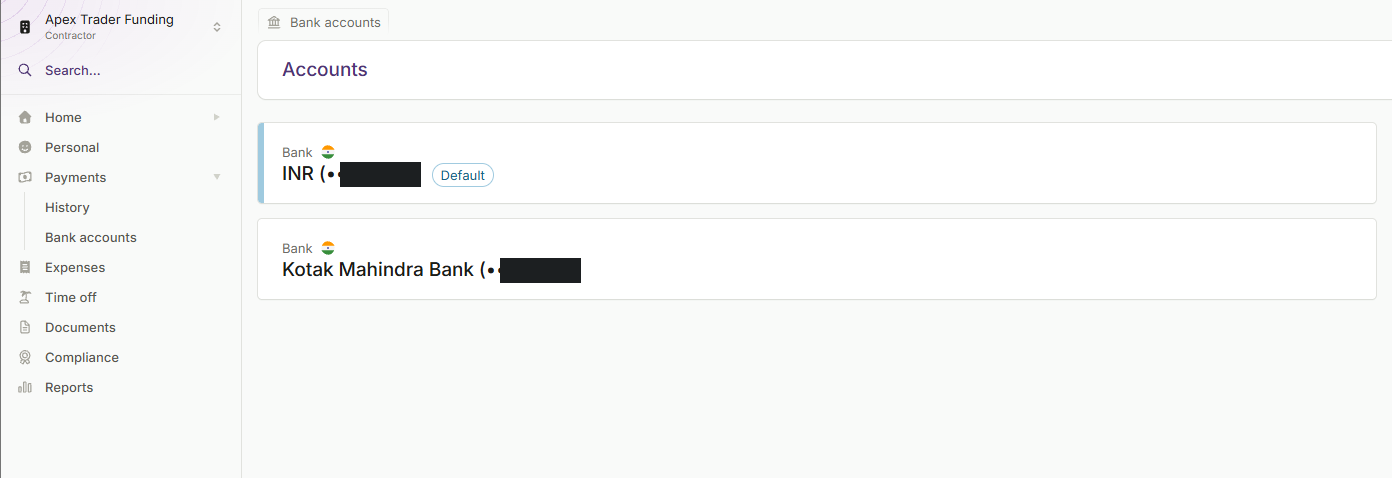
Payments → Bank accounts in Plane. Two INR accounts, one default. Account numbers masked. -
06
Three to five days
The transfer
Plane converts to rupees and sends. You get a receipt that explains every rupee.
Once Apex's money reaches your Plane balance, Plane creates a transfer to your default bank account. In History it shows as a payment from Apex Trader Funding Inc with a reference number, a status, the USD amount and the INR amount actually sent. Behind it is a downloadable transfer receipt from Plane's payment partner, which lists the source amount in dollars, the fee, the exchange rate to four decimals and the destination amount in rupees, with your bank and masked account number.
You don't have to watch the dashboard for this step. The moment Plane sends, it emails you: the rupee amount, the last digits of the account, and an expected arrival date, which in my inbox has always been the next working day. If that email has arrived, the money is between Plane's bank and yours and there is nothing left to check on Plane's side.
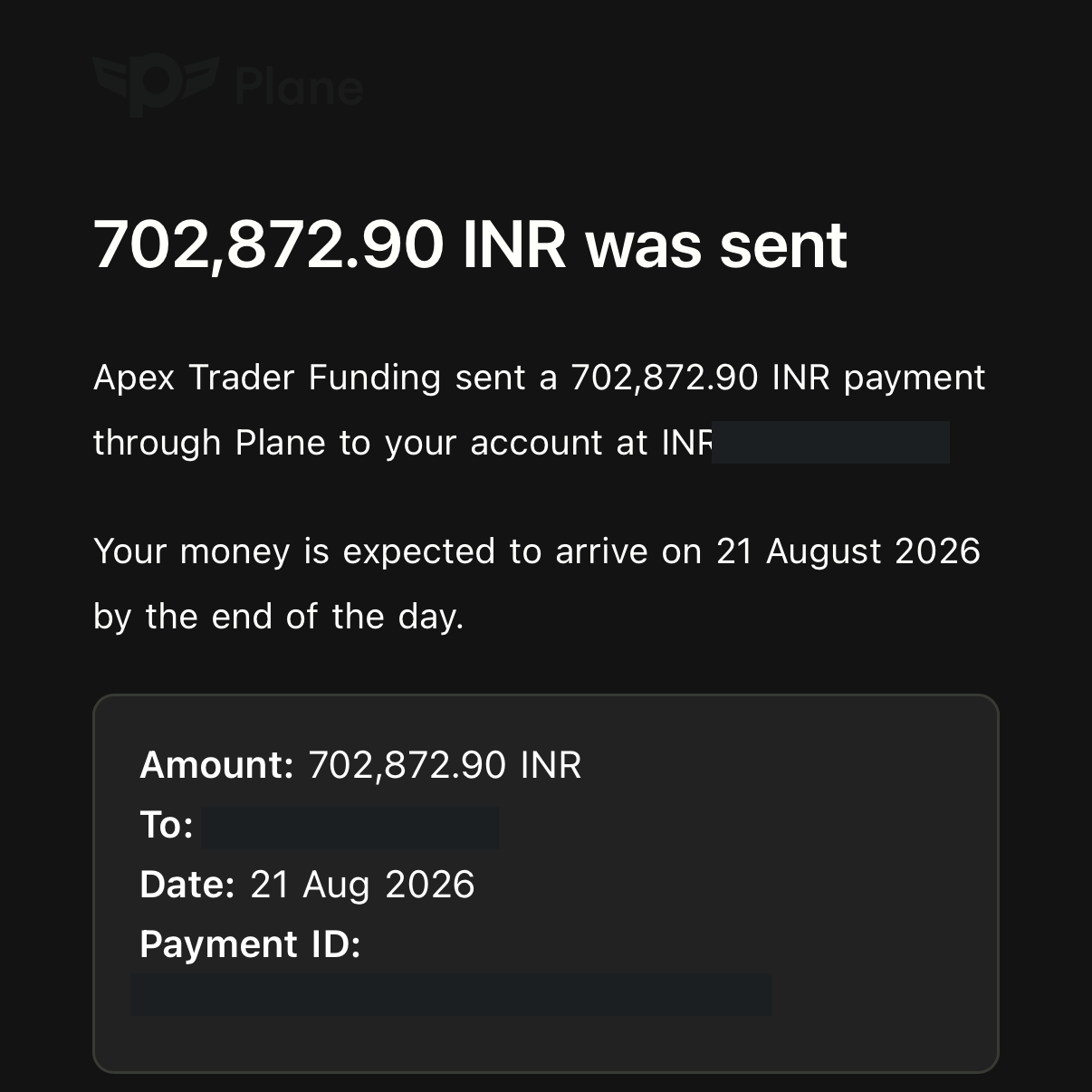
The "was sent" email from Plane, August 2026. Sent on the 20th, expected on the 21st. Account digits and payment ID masked. 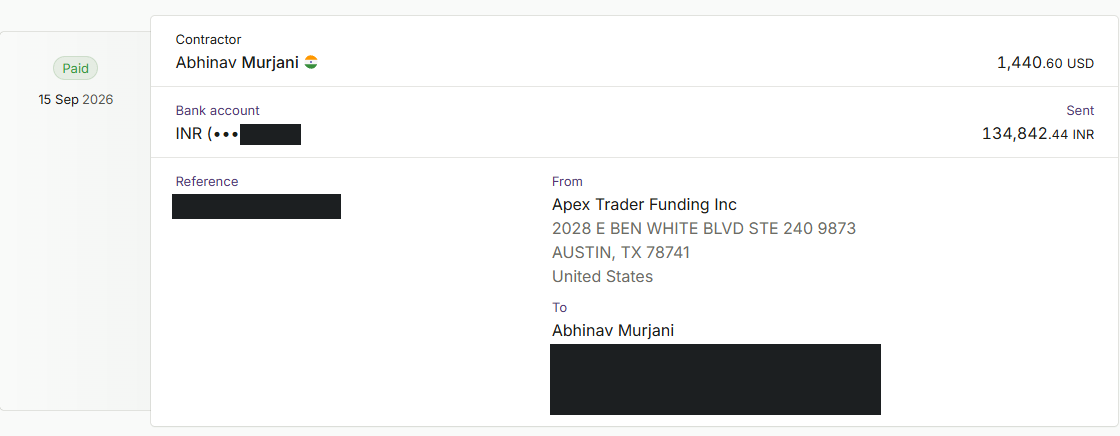
The History entry for the payout in the chart above. USD in, INR out, status Paid. Reference and address masked. 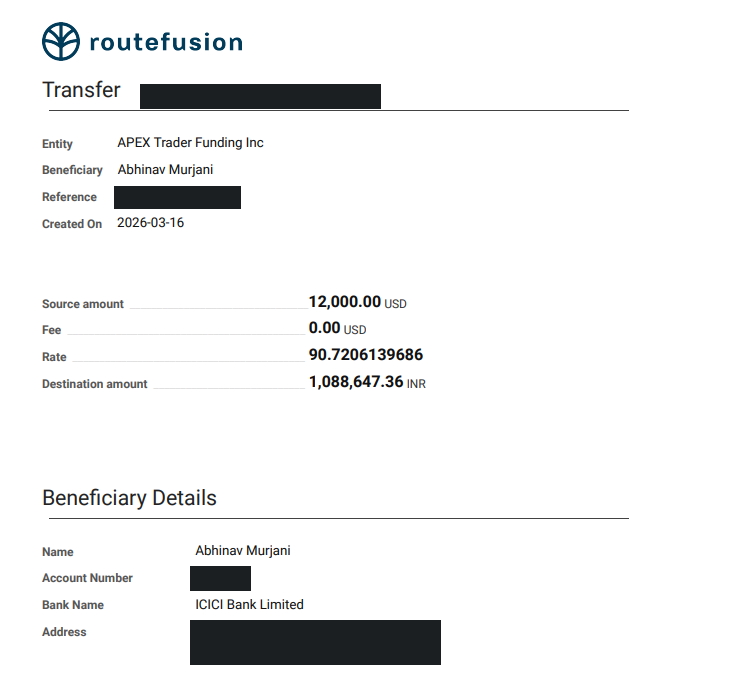
A transfer receipt from March 2026, when I pulled several accounts' payouts together: $12,000 in, ₹10,88,647 out, fee zero, rate printed to ten decimals. Identifiers masked. That receipt is the most useful piece of paper in the whole process. It shows a licensed US money service business paying a named Indian beneficiary at a stated rate with a stated fee. It's the answer to any question a bank could ask, and it's the line item your CA reconciles against the bank credit.
- Shows as
- payment from Apex Trader Funding Inc
- Arrives as
- INR credit, already converted
- Transfer fee on my receipts
- 0.00 USD
- Rate
- set on the receipt; ₹93.60 per $ on 11 Sep 2026
- Plane balance to bank
- 2–3 working days; "was sent" email the day before it lands
-
07
When it looks stuck
Which clock to check
Two companies, so first work out whose queue you're in.
Someone asked me about their eighth EOD payout: approved by Apex, nothing in Plane two days later. That's normal. Two days is inside the window where Apex has approved but the money hasn't settled in Plane yet, and refreshing either dashboard won't move it.
- Apex status not Paid after 3 daysApex's queueOpen a ticket with Apex support quoting the account and request date. Check the four gates in stage 01 first; a quiet denial is usually the safety net.
- Paid at Apex, nothing in Plane after 4 working daysPlane's queueCheck Plane → Payments → History first. If there's no entry at all, the handover hasn't happened; that's an Apex support question. If there's an entry with a status other than Paid, it's Plane support.
- Paid in Plane, not in the bank after 3 working daysYour bank's queueDownload the transfer receipt from Plane and call the bank with the reference. In two years I have never needed to do this.
- First payout, no invite after 4 daysCheck spam, then ApexThe invite comes from Plane, not Apex, so it lands in Promotions or spam more often than you'd think.
Count working days. US bank holidays pause Plane's rail, Indian bank holidays pause the last hop, and neither dashboard tells you which one you're waiting on. -
08
After the sixth
The account closes, the Plane account doesn't
Plan for the ladder, not just the payout.
An Apex performance account pays out at most six times, then closes. On a 50K EOD account that's $13,000 if you take the maximum every time; the ladder rises from $1,500 on the first to $3,000 on the sixth. When it closes you pass a new evaluation and the new performance account starts its own ladder at payout one.
Your Plane account carries over. New Apex account, same Plane login, same bank details, no new invite. That's the part that makes payout two onwards feel effortless, and it's why I tell people the pain of the first one is a one-time cost, not the price of every payout.
One habit worth stealing: I sometimes get three or four payouts out of a single account before it breaches, and I take the partial on the first one to recover the account cost. Everything after that is house money going through a pipe you've already built.
Same process, different portal: Lucid pays through WorkMarket, Tradeify and MyFundedFutures through Rise.
See all four comparedThe whole thing on one card
- Where to request
- Apex dashboard → Payouts
- Apex approval
- same day to 3 days
- Payout portal
- Plane, as a contractor of Apex Trader Funding Inc
- First-time extras
- invite email, KYC, W-8BEN — adds 2–3 days, once
- Bank account type
- INR savings account, added inside Plane
- Approval to bank, repeat payout
- 3–5 days
- Approval to bank, first payout
- roughly a week to ten days
- What lands
- rupees, with a receipt showing rate and fee
- Payouts per account
- 6, then the account closes; Plane stays
Get funded with Apex
Slowest rail of the four, but the most accounts, the deepest discounts and the payout system I learned all of this on. Now you know what the first-payout wait is for.
Enter ABHI at checkout — that's what applies the discount and credits the sale to me.
My own experience taking Apex payouts as an Indian resident, current as of September 2026. Apex rule figures (safety net, qualifying days, consistency, the payout ladder) are from Apex's published 4.0 rules as of March 2026 and can change; the dashboard is the authority. Plane timings, rates and fees are from my own receipts and will vary. Nothing here is tax or legal advice; talk to a chartered accountant about how payouts fit your return. Trading futures involves substantial risk of loss.